
Brief summary of this post:
1. The user enters a passphrase which is unique to the group chat and has to be shared to the user for granting him access.
2. The passphrase is saved in SharedPreferences.
3. A master key is generated using the passphrase.
4. While sending message, a secret key is generated using the master key and message ID. The message is encrypted using this secret key.
5. On retrieving message, it is decrypted using a secret key generated using master key and message ID.
Steps:
1. In Button to enter the group chat page, add a dialog box (dialog2) with EditText (dialog_text1) where user can enter the passphrase. On entering the passphrase it is saved in SharedPreferences (sp:sp) and user moves to group chat activity using intent component.

Code to add an EditText to Dialog component:
final EditText dialog_text1 = new EditText(AdminpageActivity.this);
dialog_text1.setLayoutParams(linear2.getLayoutParams());
dialog2.setView(dialog_text1);
Code to get text from EditText:
dialog_text1.getText().toString()
2. Add another button which can be used to reenter passphrase, in case user has entered the wrong passphrase.

3. In local library manager, add the following library and select it:
androidx.security:security-crypto:1.1.0-alpha06
4. In Java/Kotlin manager, add a new Java class file EncryptionHelper.java and put following codes in it. Make sure to keep your own package name at the top.
package com.my.dmchat;

import android.security.keystore.KeyGenParameterSpec;
import android.security.keystore.KeyProperties;
import android.util.Base64;
import java.util.Arrays;

import android.content.SharedPreferences;
import android.content.Context;
import androidx.security.crypto.MasterKey;
import androidx.security.crypto.EncryptedFile;
import androidx.security.crypto.EncryptedSharedPreferences;

import java.nio.charset.StandardCharsets;
import java.security.Key;
import java.security.KeyStore;
import javax.crypto.Cipher;
import javax.crypto.KeyGenerator;
import javax.crypto.SecretKey;
import javax.crypto.spec.GCMParameterSpec;
import javax.crypto.Mac;
import javax.crypto.SecretKeyFactory;
import javax.crypto.spec.PBEKeySpec;
import java.security.spec.KeySpec;
import javax.crypto.spec.SecretKeySpec;

public class EncryptionHelper {

    /**
     * Derives a Master Key from a given passphrase using PBKDF2.
     * @param passphrase The user's passphrase.
     * @return SecretKey The derived master key.
     * @throws Exception if key derivation fails.
     */
    public static SecretKey deriveMasterKey(String passphrase) throws Exception {
        byte[] salt = "SomeFixedSaltValue".getBytes(StandardCharsets.UTF_8); // Can be static or unique per chat
        int iterations = 100000;
        int keyLength = 256;

        SecretKeyFactory factory = SecretKeyFactory.getInstance("PBKDF2WithHmacSHA256");
        KeySpec spec = new PBEKeySpec(passphrase.toCharArray(), salt, iterations, keyLength);
        SecretKey tmpKey = new SecretKeySpec(factory.generateSecret(spec).getEncoded(), "AES");

        return tmpKey;
    }

    /**
     * Derives a unique chat-specific encryption key from the master key using HMAC.
     * @param masterKey The master key.
     * @param chatID The chat identifier.
     * @return SecretKey The derived chat key.
     * @throws Exception if key derivation fails.
     */
    public static SecretKey deriveChatKey(SecretKey masterKey, String chatID) throws Exception {
        Mac hmac = Mac.getInstance("HmacSHA256");
        hmac.init(masterKey);
        byte[] secretKeyBytes = hmac.doFinal(chatID.getBytes(StandardCharsets.UTF_8));

        return new SecretKeySpec(Arrays.copyOf(secretKeyBytes, 16), "AES"); // 128-bit AES key
    }

    /**
     * Encrypts a message using AES-GCM encryption.
     * @param chatKey The AES key used for encryption.
     * @param plaintext The message to be encrypted.
     * @return Encrypted message as a Base64 string.
     * @throws Exception if encryption fails.
     */
    public static String encryptMessage(SecretKey chatKey, String plaintext) throws Exception {
        Cipher cipher = Cipher.getInstance("AES/GCM/NoPadding");
        cipher.init(Cipher.ENCRYPT_MODE, chatKey);
        byte[] iv = cipher.getIV();
        byte[] encryptedData = cipher.doFinal(plaintext.getBytes(StandardCharsets.UTF_8));

        byte[] combined = new byte[iv.length + encryptedData.length];
        System.arraycopy(iv, 0, combined, 0, iv.length);
        System.arraycopy(encryptedData, 0, combined, iv.length, encryptedData.length);

        return Base64.encodeToString(combined, Base64.DEFAULT);
    }

    /**
     * Decrypts an AES-GCM encrypted message.
     * @param chatKey The AES key used for decryption.
     * @param encryptedData The Base64 encoded encrypted message.
     * @return Decrypted plaintext message.
     * @throws Exception if decryption fails.
     */
    public static String decryptMessage(SecretKey chatKey, String encryptedData) throws Exception {
        byte[] decodedData = Base64.decode(encryptedData, Base64.DEFAULT);
        byte[] iv = new byte[12]; // GCM IV length is 12 bytes
        System.arraycopy(decodedData, 0, iv, 0, iv.length);

        byte[] encryptedBytes = new byte[decodedData.length - iv.length];
        System.arraycopy(decodedData, iv.length, encryptedBytes, 0, encryptedBytes.length);

        Cipher cipher = Cipher.getInstance("AES/GCM/NoPadding");
        GCMParameterSpec spec = new GCMParameterSpec(128, iv);
        cipher.init(Cipher.DECRYPT_MODE, chatKey, spec);

        byte[] decryptedBytes = cipher.doFinal(encryptedBytes);
        return new String(decryptedBytes, StandardCharsets.UTF_8);
    }
}
5. In groupchat.xml add a ListView listview1, an EditText edittext1 and a Button send.

6. Create a Custom View groupchat_item.xml and add items as shown in image below. Select it as Custom View of listview1.

7. In GroupchatActivity, add following components:
FirebaseDb component group_chat:groupchat, Calendar component cal, Dialog components dialog and dialog2, SharedPreferences component sp:sp, and FirebaseAuth component fauth.
8. Add following variables:
- String variables message_id, message, encrypted_message, date, passphrase, uid and username.
- Map variable map.
- List Map variable maplist.
9. Add import event and put following imports:
import javax.crypto.SecretKey;
10. Create a more block Declared and put codes to declare masterkey in it:
}
SecretKey masterkey;
{
11. In onCreate, get passphrase from shared preferences and use it to generate masterkey as shown in image below:

The code to generate masterkey is:
try {
masterkey = EncryptionHelper.deriveMasterKey(passphrase);

} catch (Exception e){
showMessage(e.toString());
}
12. Create a more block addUsername(username) fromMap(Map:map) toList (List Map:maplist) and put blocks as shown below.

13. In group_chat onChildAdded event put blocks as shown in image below.

DatabaseReference usersRef = FirebaseDatabase.getInstance().getReference("users").child(uid);
 usersRef.addListenerForSingleValueEvent(new ValueEventListener() {

@Override
public void onDataChange(DataSnapshot snapshot) {
if (snapshot.exists()) {
username= snapshot.child("username").getValue(String.class);

// Put more block to add Username to maplist and refresh ListView.

}
}

@Override
public void onCancelled(DatabaseError error) {
username = uid;

// Put more block to add Username to maplist and refresh ListView.

}

});
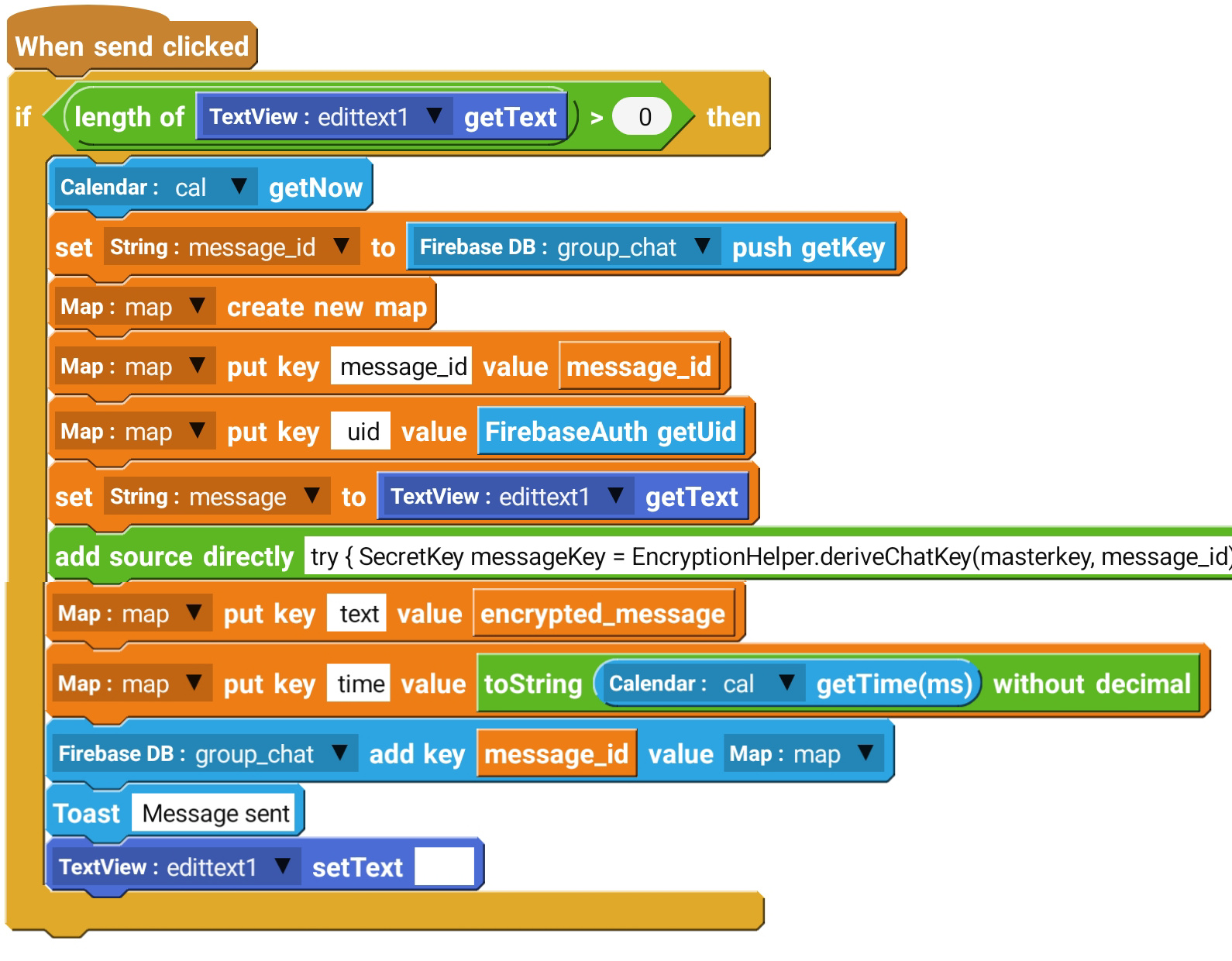
try {
SecretKey messageKey = EncryptionHelper.deriveChatKey(masterkey, message_id);

encrypted_message = EncryptionHelper.encryptMessage(messageKey, message);

} catch (Exception e){
showMessage(e.toString());
}
try {
SecretKey messageKey = EncryptionHelper.deriveChatKey(masterkey, message_id);

message = EncryptionHelper.decryptMessage(messageKey, encrypted_message);

} catch (Exception e){
showMessage(e.toString());
}


Sketchware Hub – Free Sketchware Projects, Source Code & Tutorials
Welcome to Sketchware Hub, India's most trusted platform for everything related to Sketchware Android app development. Agar aap Sketchware ke through apps banana chahte hain ya already ek developer hain, toh aap perfect jagah par aaye hain. Ye Sketchware hub aapke liye ek complete resource center hai jahan aapko free projects, detailed source code, step-by-step tutorials, aur useful extensions milenge.
Hum specifically beginners se lekar advanced developers tak ke liye content create karte hain. Hamara mission hai Sketchware development ko easy aur accessible banana har kisi ke liye. Chahe aap ek student ho, hobbyist ho, ya professional app developer banne ka soch rahe ho, Sketchware Hub aapki journey ko simpler banayega. Yahan aap real-world projects ke through practical skills seekhenge aur apne app ideas ko reality mein badal paayenge.
What is Sketchware Hub?
Sketchware Hub ek dedicated online platform hai jo Sketchware developers ki har zarurat ko poora karta hai. Sketchware ek powerful mobile application hai jisse aap block-based programming ka use karke fully functional Android apps bana sakte hain. Lekin apps banate waqt developers ko projects ke ideas, error-free source code, aur clear guidance ki zarurat hoti hai. Yahi kaam Sketchware Hub karta hai.
Hum yahan par ek organized collection maintain karte hain jismein aapko different categories ke ready-to-use projects, unka complete source code with blocks, aur video/text tutorials mil jaayenge. Ye platform sirf ek directory nahi hai, balki ek thriving community ka hub hai jahan har Sketchware user help aur resources paa sakta hai. Yahan par aap actual coding bina complex programming ke apps develop kar sakenge.
Why Sketchware Hub is Best for Sketchware Developers
Internet par kai platforms hai jo Sketchware content provide karte hain, lekin Sketchware Hub unique features ki wajah se best choice hai:
- 100% Free Sketchware Projects: Hamare saare projects completely free hain. Koi subscription ya hidden charges nahi.
- Clean and Working Source Code: Har project ka organized source code with proper comments milta hai jo actually work karta hai.
- Beginner Friendly Tutorials: Step-by-step tutorials with screenshots simple Hinglish language mein.
- Fast Loading Website: Mobile-friendly aur fast loading website jo Sketchware users ke liye optimized hai.
- Regular Updates: Naye projects, tutorials aur latest Sketchware features par regular content updates.
- No Fake or Broken Files: Har file hum personally test karte hain - koi broken links ya fake downloads nahi.
In features ki wajah se ye ek reliable Sketchware hub ke roop mein developers ka favorite platform bana hai.
Free Sketchware Projects & Tutorials Available on Sketchware Hub
Yahan par aapko practical real-world Sketchware projects ki wide collection milegi. Humne in projects ko different categories mein organize kiya hai taaki aap easily find kar saken:
Full notepad app with save, edit & delete features
Add code highlighting in your Sketchware apps
Learn custom view creation with animation
Add Google Gemini AI to your apps
Practical GenAI implementation tutorial
Secure chat app with encryption features
Complete PDF viewer implementation
Integrate Google Drive with PDF viewer
File downloading system tutorial
Data display techniques in WebView
Create app that lists all installed apps
Complete expense tracking app
Beginner friendly notepad tutorial
Essential dependencies for advanced apps
YouTube API integration project
Create custom QR code generator
Date calculation based utility app
File upload functionality guide
List management techniques
Master WebView in Sketchware
Notification based reminder app
Har project ke saath aapko complete source code, step-by-step explanation, aur working demo milta hai. Aap in projects ko download karke directly apne Sketchware app mein open kar sakte hain aur modifications kar sakte hain. Ye free collection hi is Sketchware hub ki sabse valuable resource hai.
Sketchware Source Code & Logic Blocks
Sirf project file download karna kaafi nahi hota. Aapko ye samajhna zaroori hai ki app actually kaise work karta hai. Isliye Sketchware Hub par har project ke saath uska complete source code blocks ke form mein diya jaata hai.
Hum source code ko visually clear sections mein present karte hain:
- UI Components Blocks: App interface design ke saare blocks
- Logic & Function Blocks: App functionality ke programming blocks
- Event Handling Blocks: User interactions handle karne ke blocks
- Data Management Blocks: Local storage aur database operations
- Third-Party Integration Blocks: APIs aur services ke connection blocks
Har important block ko highlight kiya jaata hai aur uska purpose explain kiya jaata hai. For example, agar koi project mein Firebase authentication use hua hai, toh hum specifically uss section ke blocks ko alag se detail mein samjhayenge. Is systematic approach se, aap na sirf project copy kar paate hain balki actually samajh bhi paate hain ki app ka logic kaise work karta hai.
Learning Benefit: Source code dekh kar aap professional coding patterns seekhte hain. Aapko pata chalega kaise experienced developers complex problems solve karte hain, kaise app structure organize karte hain, aur kaise efficient blocks use karte hain. Ye practical knowledge aapko better Sketchware developer bana deta hai.
Sketchware Tutorials for Beginners
Agar aap bilkul naye hain Sketchware mein, toh tension ki koi baat nahi. Sketchware Hub par aapko basic se lekar advanced tak ke tutorials mileinge jo aapko confident app developer bana denge.
Hamare tutorials ki special features:
- Zero to Hero Approach: Hum assume karte hain ki aapko kuch nahi aata aur basic se start karte hain
- Visual Learning: Har step ke screenshots aur diagrams ke saath explanation
- Real Project Based: Sirf theory nahi, actual projects banate hue sikhte hain
- Common Errors Solutions: Beginners ko aane wali common problems aur unke solutions
- Practice Exercises: Har tutorial ke baad practice tasks for better understanding
Tutorials cover karte hain topics jaise: Sketchware interface kaise use karein, basic blocks ka meaning aur usage, first simple app kaise banaye, debugging techniques, app optimization, aur finally Google Play Store par apna app kaise upload karein.
Hamare tutorials ki language simple Hinglish hai jisse complex concepts bhi easily samajh aate hain. Aap apni speed par sikhein aur jab bhi stuck ho jaayein, tutorials refer kar saken. Ye complete learning path aapko is Sketchware hub se mil jaata hai.
Sketchware Extensions & Advanced Features
Sketchware ki real power uski extensions aur advanced features mein hai. Sketchware Hub par aapko popular extensions aur libraries ke baare mein complete practical guides milti hain.
Covered advanced topics:
- Firebase Integration: Authentication, Realtime Database, Firestore, Storage
- AdMob Monetization: Banner ads, Interstitial ads, Rewarded ads implementation
- API Integration: REST APIs, JSON parsing, third-party services connection
- WebView Mastery: Complete WebView control, JavaScript interface, file handling
- Custom Libraries: Adding external .jar files, using GitHub libraries
- Material Design: Modern UI components and design patterns
- Local Database: SQLite implementation and data management
Hum specifically batate hain ki:
1. Kaun si extension kya kaam karti hai aur kab use karein
2. Extension kaise install karein Sketchware mein
3. Uske blocks kaise use karein practical projects mein
4. Extension related common errors aur unke solutions
For example, agar aap chahte hain ki aapki app mein Google Maps integrate ho, toh hum aapko complete guide denge - Maps SDK setup se lekar actual implementation tak. Is tarah, ye section aapko professional-level apps banane ki capability deta hai. Ye advanced resources hi Sketchware hub ko other platforms se different banate hain.
Is Sketchware Hub Free to Use?
Ji haan, 100% bilkul FREE! Sketchware Hub ek completely free educational platform hai. Humara mission hai Sketchware app development ko har kisi ke liye accessible banana - chahe woh student ho, job seeker ho, ya koi entrepreneur.
No Hidden Charges: Humare paas koi premium membership, subscription plans, ya paid courses nahi hain. Saara content lifetime free rahega.
Aap directly website visit karke saare resources access kar sakte hain, projects download kar sakte hain, aur tutorials follow kar sakte hain. Future mein bhi hum is platform ko free hi rakhenge. Hum believe karte hain ki knowledge should be free and accessible to all.
Agar aap chahein toh hamari help kar saken hamare content ko share karke, feedback dekar, ya apne suggestions bhej kar. Lekin ye sab optional hai. Aap bin kisi tension ke apni learning journey continue kar saken. Ye promise hai Sketchware Hub ki taraf se aap sabhi developers ke liye.
FAQs about Sketchware Hub
Sketchware Hub kya hai aur kaise use karein?
Sketchware Hub ek free online resource platform hai Sketchware developers ke liye. Aap website par jaakar directly projects download kar saken, tutorials follow kar saken, ya source code dekh saken. Kisi registration ya login ki zarurat nahi hai.
Kya Sketchware Hub par projects safe hain? Virus toh nahi honge?
Bilkul safe hain! Hum personally har project ko test karte hain aur sirf clean .sw files hi upload karte hain. Hamari website secure https connection par hai aur koi malicious content nahi hai. Aap confidently download kar saken.
Kya beginners is platform ko use kar saken?
Haan, bilkul! Humne specifically beginners ke liye "Tutorials for Beginners" section banaya hai. Aap basic concepts se start kar sakte hain aur gradually advanced projects ki taraf badh saken. Humari simple Hinglish language beginners ke liye perfect hai.
Sketchware Hub completely free hai ya baad mein charges lagega?
Sketchware Hub 100% free hai aur hamesha free rahega. Humare paas koi premium plans nahi hain na hi future mein banayenge. Ye humara commitment hai Sketchware community ke liye.
Kya Sketchware Hub use karne ke liye Android Studio aana chahiye?
Nahi, bilkul bhi nahi. Sketchware Hub specifically Sketchware mobile app ke liye hai jismein aap blocks se programming karte hain. Aapko Android Studio, Java, ya koi traditional coding language aane ki zarurat nahi hai.
Main apna project Sketchware Hub par submit kar sakta hoon?
Haan! Hum encourage karte hain ki developers apne banaye projects humare saath share karen. Aap humare contact page se humse connect kar saken. Quality projects ko hum proper credit ke saath website par publish karte hain.
Conclusion
Sketchware Hub aapka trusted partner hai Android app development journey mein. Chahe aap ek simple idea search kar rahe hain, complex source code samajhna chahte hain, ya phir naya skill seekhna chahte hain - ye platform aapki har need ko poora karta hai.
Hum regularly naye content add karte rehte hain - latest Sketchware features, new project ideas, aur updated tutorials. Hamara goal hai India ke har aspiring app developer ko empower karna taaki woh bina kisi financial barrier ke apne app ideas ko reality mein badal saken.
Aaj hi explore karein hamare projects collection, apne interest ke tutorial se start karein, aur apna pehla professional app banayein. Agar koi sawaal ho toh hum se contact kar saken. Happy coding with Sketchware Hub - your ultimate Sketchware resource destination!
"From beginners to professionals - One hub for all Sketchware needs."


0 Comments